When to Buy, When to No-Code, and When to Build Custom Software
Building custom software too early burns runway, while stretching spreadsheets and Zapier past their breaking point stalls operations. Here is a practical triage matrix for choosing between off-the-shelf SaaS, no-code, and lean custom engineering.
The Two Expensive Mistakes Growing Teams Make
Business leaders usually fall into one of two opposite traps when deciding how to power their operations. The first group jumps straight into custom engineering for problems already solved better and cheaper by standard SaaS—spending months rebuilding invoice templates, payroll calculations, or basic calendar booking.
The second group goes too far in the other direction. Determined to "stay lean," they glue together Airtable bases, Typeform, Google Sheets, Zapier zaps, and Softr portals long after the business has outgrown them. By the time operations grind to a halt, four people spend half their week manually reconciling broken syncs while paying $1,500 a month across fragile subscriptions.
Choosing correctly between buying SaaS, stitching no-code, and building custom software is not an ideological debate—it is an economic triage decision.
The Triage Matrix: Buy vs. No-Code vs. Custom Build
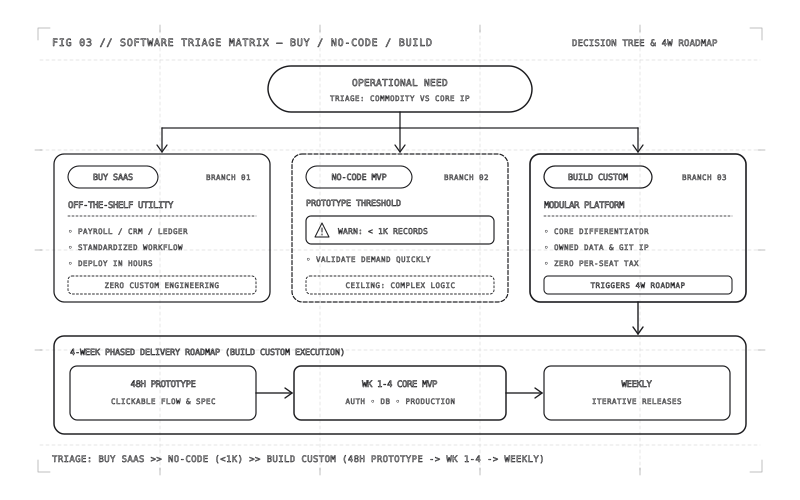
Every workflow inside your company belongs in one of three buckets depending on whether it differentiates you from competitors and how much operational volume it carries:
- Buy Off-the-Shelf SaaS for Commodities: Payroll, statutory tax compliance, payment card processing, transactional email delivery, and standard video conferencing are solved commodities. Buying Stripe, QuickBooks, or a dedicated payroll provider gives you compliance updates and battle-tested reliability for pennies compared to engineering time.
- Use No-Code for Experiments Under 1,000 Records: When testing a brand-new service offering, running an internal intake form, or validating whether customers will pay at all, tools like Airtable, Webflow, and Zapier let a non-technical operator launch in 48 hours. Keep it lightweight, accept the visual constraints, and prove demand first.
- Build Custom When the Workflow Is Your Moat: The moment a workflow determines your speed of delivery, customer experience, proprietary pricing logic, or unit margins—or requires external clients to log in and trust your brand—custom software shifts from an expense into a permanent balance-sheet asset.
┌──────────────────────────────────┐
│  New Operational or Product Need │
└─────────────────┬────────────────┘
                  ▼
┌──────────────────────────────────┐   Yes   ┌─────────────────────────────┐
│ Is this a solved back-office     │ ──────▶ │ BUY OFF-THE-SHELF SAAS      │
│ commodity (payroll, tax, cards)? │         │ (QuickBooks, Stripe, etc.)  │
└─────────────────┬────────────────┘         └─────────────────────────────┘
                  │ No
                  ▼
┌──────────────────────────────────┐   Yes   ┌─────────────────────────────┐
│ Internal experiment only AND     │ ──────▶ │ USE NO-CODE / LOW-CODE      │
│ under ~1,000 active records?     │         │ (Validate demand in 48 hrs) │
└─────────────────┬────────────────┘         └─────────────────────────────┘
                  │ No (Core Moat / Scale / Client Portal)
                  ▼
┌──────────────────────────────────────────────────────────────────────────┐
│ BUILD LEAN CUSTOM SOFTWARE (Phased 4-Week MVP • Zero Per-Seat Tax)       │
└──────────────────────────────────────────────────────────────────────────┘
The Four Breaking Points of No-Code at Scale
No-code platforms rarely explode overnight; they decay quietly until your operations team loses trust in the data. Watch for these four clear warning signs that you have crossed the threshold into custom engineering territory:
- Race Conditions & Silent Failures: When two Zapier or Make scenarios fire on the same customer record within milliseconds of each other, one overwrites the other's updates silently. Nobody notices until a client receives two conflicting invoices or an onboarding task vanishes.
- Sync Lags & API Rate Limits: Polling-based automations introduce 5-to-15-minute delays between a customer submitting a payment and gaining portal access. Worse, hitting Airtable's record ceilings or API rate limits freezes your entire team mid-afternoon.
- Permission Leaks: Trying to expose one clean slice of an internal spreadsheet to external clients or regional partners often forces awkward duplicate bases. One misconfigured view share can expose another client's pricing or contact details.
- Escalating $1,500/Month Glue Bills: Individual plans look cheap at $29/month—until you multiply per-seat fees across a 20-person team, upgrade Zapier tiers for multi-step webhooks, and pay enterprise add-ons just to get basic SSO or audit history.
Buy vs. No-Code vs. Lean Custom Software
| Decision Factor | Buy (Commercial SaaS) | No-Code Glue Stack | Lean Custom Software |
|---|---|---|---|
| Initial Setup Cost | Very low (hours of configuration) | Low (days of builder time) | Moderate fixed sprint (4-week core MVP) |
| Monthly Cost Trajectory | Scales linearly per user seat forever | Steep jumps as task volume & seats grow | Flat cloud compute ($20–$150/mo) |
| Workflow Flexibility | Rigid; your team adapts to the vendor | Flexible until complex branching breaks | 100% tailored to your exact business rules |
| Data Ownership & Security | Stored in vendor cloud on their terms | Fragmented across 4–6 third-party apps | Single private database with strict RBAC |
| Ideal Lifespan & Ceiling | Permanent for non-core utilities | Months 0–6 validation & small internal ops | Multi-year core IP & customer-facing scale |
You Do Not Need $200,000 Upfront to Build Custom
Many founders tolerate broken spreadsheets for years because they assume custom software means a nine-month, $150,000 enterprise contract. Modern engineering tooling has changed those economics completely. With typed full-stack frameworks, clean relational databases, and focused senior builders, we ship custom software through a disciplined three-stage cadence:
- Stage 1 — 48-Hour Clickable Prototype: Before writing complex backend integrations, we map your highest-friction workflow into an interactive browser prototype so your team clicks through real screens and trims unnecessary fields immediately.
- Stage 2 — 4-Week Core MVP: We ship one focused, production-grade release covering your core database, clean authentication, and primary operational loop—replacing the worst spreadsheet or fragile Zapier chain right away.
- Stage 3 — Weekly Iterations: Once live staff or customers use the system daily, every subsequent week adds targeted refinements grounded in real usage metrics rather than guesswork.
export interface WorkflowTriageScore {
  workflowName: string
  isCompetitiveMoat: boolean
  monthlyActiveRecords: number
  externalCustomerFacing: boolean
  currentSaasAndGlueSpendMonthlyUsd: number
}

export function recommendBuildStrategy(
  input: WorkflowTriageScore,
): 'buy_saas' | 'no_code_mvp' | 'build_custom' {
  if (!input.isCompetitiveMoat && !input.externalCustomerFacing) {
    return 'buy_saas'
  }
  if (input.monthlyActiveRecords < 1000 && !input.externalCustomerFacing) {
    return 'no_code_mvp'
  }
  return 'build_custom'
}Rent software for standard utilities, use no-code to test unverified ideas under 1,000 records, and invest in lean custom engineering the moment a workflow defines your customer experience or starts compounding per-seat and automation fees.