Practical AI in Everyday Operations: Connecting LLMs to Gmail, Slack, QuickBooks & Notion
Most businesses do not need six-figure custom AI model training or generic website chatbots that invent answers. Real ROI comes from wiring AI into the everyday tools your team already runs—Gmail, Slack, HubSpot, QuickBooks, and Notion—with deterministic validation and human approval.
Why Most Company "AI Projects" Stall Before Paying Off
Almost every operations leader we meet has the same story. Their team already uses ChatGPT or Claude in browser tabs to draft emails or summarize meeting notes, so leadership knows AI saves time. Yet when they ask vendors how to automate actual company work, they get pitched expensive custom model training, bloated enterprise AI platforms, or generic website chatbots that confidently hallucinate refund policies to paying customers.
Here is the practical truth: businesses do not need custom AI research. They need reliable operational plumbing.
Every week, skilled finance, sales, and support staff burn hours acting as human middleware—downloading PDF invoices from Gmail, typing line items into QuickBooks, copying lead details from web forms into HubSpot, pinging teammates in Slack, and answering the same pricing questions already documented in Notion. Wiring AI cleanly between those exact five tools delivers measurable ROI in weeks, not quarters.
Four High-ROI Workflows You Can Run in Production Today
Across client deployments at Febin & Dale Ventures, four operational automations consistently pay for themselves fastest:
1. Automated PDF & Invoice Reading With Deterministic Math Checks
Vendor invoices arrive in every format imaginable—scanned PDFs, multi-page spreadsheets, email attachments with inconsistent tax labels. Language models excel at extracting structured fields (vendor name, invoice number, line items, GST/VAT amounts, due dates) from messy layouts. However, you should never trust a language model to do accounting math unchecked.
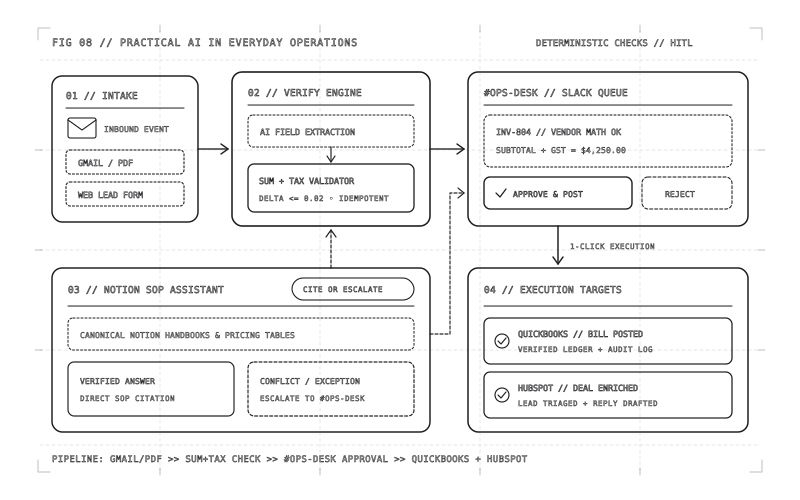
Our pattern separates extraction from verification: the model parses the PDF into strict JSON, and a deterministic TypeScript validator checks every line-item sum, tax calculation, duplicate invoice number, and currency match before queuing a draft bill in QuickBooks or Xero.
export interface ParsedInvoice {
  vendorName: string
  invoiceNumber: string
  currency: 'INR' | 'USD' | 'AED'
  lineItems: Array<{ description: string; qty: number; unitPrice: number }>
  taxAmount: number
  statedTotal: number
}

export function verifyInvoiceMath(inv: ParsedInvoice): { valid: boolean; computedTotal: number } {
  const subtotal = inv.lineItems.reduce((sum, item) => sum + item.qty * item.unitPrice, 0)
  const computedTotal = Math.round((subtotal + inv.taxAmount) * 100) / 100
  const delta = Math.abs(computedTotal - inv.statedTotal)
  return { valid: delta <= 0.02, computedTotal }
}
2. Inbound Lead Triage Across Gmail, HubSpot & Slack
Speed-to-lead decides deals, especially for service businesses and B2B SaaS teams. When an inquiry lands in Gmail or a contact form, an automation reads the thread in seconds, classifies urgency and service fit, checks HubSpot for existing company history, creates or enriches the deal record, and posts a clean briefing card in Slack—complete with a pre-drafted reply tailored to your tone of voice. Instead of leads sitting unread overnight in a founder's inbox, the right account owner reviews a contextual draft and responds in under two minutes.
3. 24/7 Assistants Grounded Strictly in Notion SOPs ("Cite or Escalate")
Generic chatbots fail because they answer from general internet training rather than your company's current policy. By indexing only your approved Notion handbooks, pricing tables, and onboarding SOPs—and enforcing a strict cite-or-escalate rule—the assistant either answers with direct links to the verified Notion page or cleanly hands the ticket to a human specialist with full context. Zero guesswork, zero invented discounts.
In practice, making Notion retrieval reliable takes less magic than people assume: keep each policy in one canonical Notion page with a clear owner and "Last Reviewed" date, separate internal staff playbooks from customer-facing pricing rules, and explicitly instruct the workflow to escalate whenever two documents conflict or a customer asks for an exception.
4. One-Click Human-in-the-Loop Approvals in Slack
Full autonomy is overrated whenever money, legal commitments, or client relationships are on the line. When an automation retries a webhook or posts a bill twice, speed without guardrails simply creates faster messes. Every workflow we ship tracks an explicit idempotency key per email thread or invoice PDF and routes irreversible actions through a human decision-maker inside Slack:
┌───────────────────┐     ┌───────────────────────┐     ┌─────────────────────────┐
│ Trigger Event     │ ──▶ │ AI Extraction / Draft │ ──▶ │ Deterministic Validator │
│ (Gmail / PDF /    │     │ + Notion SOP Context  │     │ (Math, Schema & Rules)  │
│  Web Inquiry)     │     └───────────────────────┘     └────────────┬────────────┘
└───────────────────┘                                                │
                                                                     ▼
┌───────────────────┐     ┌───────────────────────┐     ┌─────────────────────────┐
│ Executed Safely   │ ◀── │ 1-Click Approval Card │ ◀── │ If Check Passes: Queue  │
│ (QuickBooks /     │     │ in Slack (#ops-desk)  │     │ If Mismatch: Flag Human │
│  HubSpot / Email) │     └───────────────────────┘     └─────────────────────────┘
Manual Operations vs. Grounded Workflow Automation
| Daily Workflow | Manual Copy-Paste Process | Practical AI + Guardrail Pipeline |
|---|---|---|
| Vendor Invoice Entry | 10–15 mins per PDF; manual typos & tax errors | Auto-parsed in 4s; math verified; posted to QuickBooks on 1 click |
| Inbound Lead Response | Hours waiting in shared inbox; stale CRM records | Instant HubSpot sync + Slack alert with ready-to-edit draft reply |
| Internal & Client Q&A | Repeated Slack interruptions for SOPs & pricing | 24/7 Notion-grounded assistant with strict "cite or escalate" policy |
| Accountability & Control | Ad-hoc spreadsheets and verbal confirmations | Full audit log + Slack approval checkpoint before external actions |
Let language models read messy human inputs and draft structured responses, let deterministic code verify math and permissions, and let your team make final judgment calls in one click inside Slack. That combination beats "fully autonomous AI" on reliability every single time.